

A practical guide to API-first payment infrastructure for Indonesian merchants
What "API-first" means for payments, why it suits online businesses in Indonesia, and how to plan your integration step by step.
Published 04 October 2026 3 min read

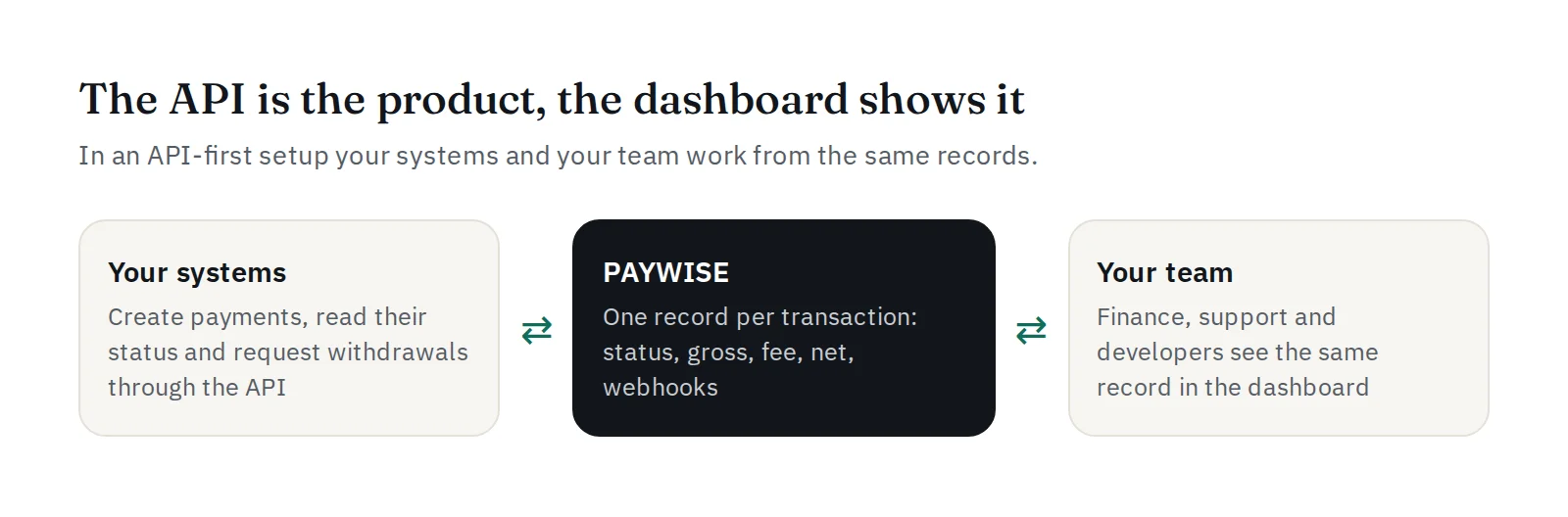
"API-first" means the API is the main way to use the product, and everything else, including the dashboard, is built on the same records. For payments, it means your checkout, your app and your back office all talk to one system, and nothing depends on someone copying numbers by hand.
Why it suits Indonesian merchants
Online businesses in Indonesia often sell through several channels at once: a website, an app, a marketplace store, sometimes a chat-based shop. With an API-first payment platform:
- every channel creates payments the same way, with your own order ID;
- every channel learns about payments the same way, through signed webhooks;
- your finance team sees all of them in one place, with the same gross, fee and net.
Plan your integration in five steps
1. Map your flows. Write down where payments start (checkout, invoice, top-up) and what must happen when one is paid, fails or expires.
2. Choose your order IDs. Use your own order number as merchant_reference. It links PAYWISE to your system, and it protects you from duplicates: sending it again returns the same payment. Also send a customer_id (your user ID, username or email) so you can see who paid.
3. Decide how customers pay. Either show the QR code or USDT address in your own page, or send customers to the PAYWISE payment page (checkout_url), which already handles the countdown and status updates. The second option is faster to build.
4. Handle webhooks first. Build and test your webhook handler before your checkout UI. It is the part that decides whether an order is paid, so it deserves the most care. Verify every signature.
5. Test, then go live. Run every scenario in the sandbox, including failures, then swap your pw_test_ key for a pw_live_ key.
Security basics
- Keep API keys on your server only, never in an app or a browser.
- Limit each key to your servers' IP addresses on the API Keys page.
- Turn on two-factor sign-in for your team, and give each person only the role they need.
- Never mark an order as paid from the customer's return URL alone: wait for the webhook, or check the transaction through the API.
No developer? Start with a plugin
If you run WooCommerce, the PAYWISE plugin gives you QRIS and USDT at checkout without writing code. The PHP and Node.js SDKs on the Developers page make a custom integration shorter.
When you are ready, the API documentation has every endpoint, field and error code.


