

Fake QRIS: how to spot it and check a real QRIS before you pay
Stickers over the real code, "QRIS update" links and fake payment screenshots. Learn the signs of a fake QRIS, a ten-second check before you pay, what to do if you already paid, and how merchants can protect their QRIS.
Published 29 October 2026 10 min read

QRIS makes paying as quick as scanning a code, and scammers take advantage of that. Through 2025 and 2026, reports of fake QRIS codes kept coming: QR stickers placed over a shop's real code at food stalls and canteens, codes on donation boxes and in car parks, and "QRIS update" links sent by chat. The cases are real. At a campus food court in Bandung, more than ten vendors lost money because fake stickers were placed over their QRIS, and buyers' payments went to the scammer's account.
The good news: a fake QRIS can almost always be spotted in ten seconds, once you know what to check. This guide covers the signs of a fake QRIS, how to check a real QRIS before you pay, what to do if you have already paid, and the steps merchants should take so their shop's QRIS is not misused.
What is a fake QRIS?
A fake QRIS is a QR code that looks like a shop's official QRIS, but when scanned, the money goes to someone else's bank account or e-wallet. The QRIS system itself is not faked. Bank Indonesia's QRIS network stays secure. What is faked is the code: the scammer creates a QRIS in their own name and puts it where another shop's code should be.
So the important question is not "is this QRIS valid?" but "does this QRIS really belong to the shop I am paying?" Every check below starts from that question.
The most common QRIS scams
1. A QR sticker placed over the real QRIS
This is the most reported scam. The scammer prints their own QRIS and sticks it on top of the shop's sticker, usually when the shop is busy or closed. Buyers scan as usual and see "payment successful", but the money never reaches the shop. The shop only notices when a buyer complains or when the day's statement does not add up.
2. QRIS in unattended places
Donation boxes, car parks, vending machines, street poles and unattended petrol pumps are favourite spots. There is no cashier to ask, so buyers simply scan.
3. "QRIS update" links and fake prizes (quishing)
This is called quishing (QR phishing). The scammer sends a QR code or link with a reason like "your QRIS must be updated", "claim your prize" or "verify your merchant account". Once scanned, the victim is taken to a website that asks for a PIN, an OTP or mobile banking login details. Remember: a real QRIS never asks you to open a website or type your PIN outside your payment app.
4. Fake payment screenshots
This is the reverse: a buyer cheating a shop. The buyer shows an edited "payment successful" screenshot, but no money has arrived. We cover this in detail in how to stop fake transfer receipts.
5. Pretending to be a bank, Bank Indonesia or a payment provider
Scammers contact merchants by WhatsApp or phone, claim to be bank staff, Bank Indonesia or a payment provider's support team, then ask for an OTP or ask the merchant to "install a new QRIS". Real banks and payment providers never ask for an OTP or a password. See also fake "support" accounts and phishing.
Signs of a fake QRIS
Before you pay, watch out for these signs:
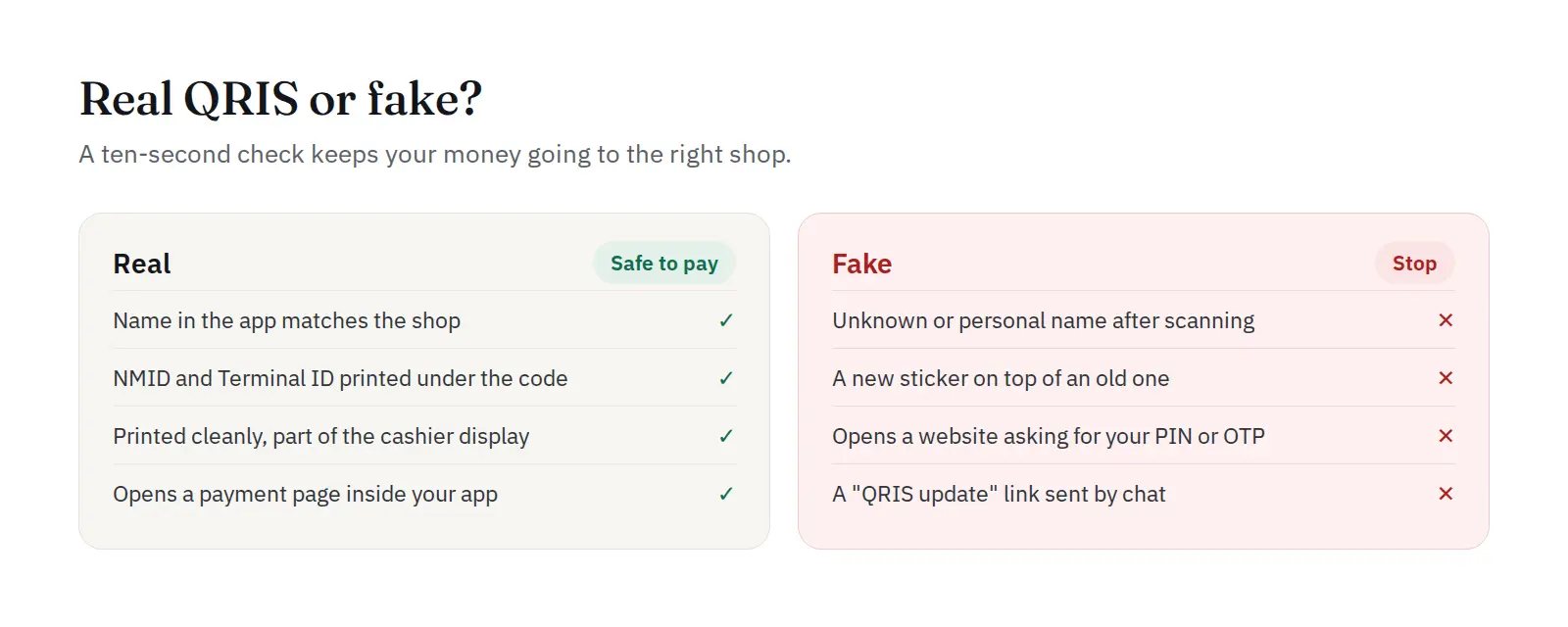
- The recipient name does not match. After scanning, your app shows the merchant name. If it shows a personal name or a name unrelated to the shop, do not pay.
- A sticker on top of a sticker. Raised edges, a crooked position, colours that differ from the sticker underneath, or a thick feel when you touch it.
- No NMID or Terminal ID. An official QRIS sticker shows the NMID (National Merchant ID) and usually a TID (Terminal ID) under the merchant name. Fake stickers often leave them out.
- Poor printing. A blurry code, broken logos, faded colours or a sticker that peels off easily.
- It opens a website, not a payment page in your app. A real QRIS opens a payment page inside your bank or e-wallet app. If a browser opens instead, stop.
- Sent by chat with an urgent reason. "Pay to this QR now, the old one no longer works" is a classic scammer line.
How to check a real QRIS before you pay
Follow these five steps. They take less than ten seconds.
- Scan from an official payment app, not your phone camera or a generic QR scanner. Your bank or e-wallet app reads the QRIS data and shows the recipient name before you pay.
- Read the recipient name carefully before you press "Pay". Match it to the shop name, its signboard or the receipt. For a QRIS on an online shop's checkout page, match it to the name shown on that official payment page.
- Check the NMID on the sticker. It usually starts with the letters ID followed by a string of numbers. If in doubt, take a photo and ask the cashier.
- Check the sticker itself. Feel the edges. A sticker added later usually feels thicker or uneven.
- Ask the cashier for large amounts. A genuine seller is happy to confirm their code. If the seller avoids the question, cancel.
One small habit helps a lot: for a large payment to a seller you have just met, pay a small amount first, ask the seller to confirm it arrived, then pay the rest.
Static vs dynamic QRIS: which is safer?
A static QRIS is one printed code used again and again. The buyer types in the amount. This is the kind most often covered by fake stickers, because it sits in the open and is rarely checked.
A dynamic QRIS is created fresh for each transaction, already holds the bill amount and usually has a time limit. It appears on the cashier's screen or an online shop's checkout page, then expires. Because it is always new and only valid for a few minutes, a dynamic code is much harder to fake with a sticker. See static vs dynamic QRIS for the full explanation.
Already paid a fake QRIS? Do this
Act fast. The sooner you report it, the better the chance the money can be frozen before the scammer moves it.
- Keep the evidence. Screenshot the transaction in your app: recipient name, amount, date, time and reference number. Also photograph the QRIS sticker you scanned.
- Report it to your bank or e-wallet through its call centre or the official help menu in its app. Ask for a fraud report and for the recipient account to be traced.
- Report it to the Indonesia Anti-Scam Centre (IASC) at iasc.ojk.go.id. This official OJK channel exists so that scammers' accounts can be blocked quickly. By September 2026, IASC had received more than 700,000 fraud reports, and part of the victims' money has been returned.
- Tell the shop owner or the site manager so the fake sticker is removed before anyone else pays.
- Report it to the police if the amount is large. Bring all the evidence above.
For questions about payment systems, you can also contact Bank Indonesia on 131 or OJK on 157.
For merchants: how to protect your shop's QRIS
A fake QRIS hurts a merchant twice: the buyer's money is lost, and so is the buyer's trust. These steps cut the risk sharply.
Physical shops
- Check your QRIS sticker every time you open and close. Make it part of the routine, like counting the till.
- Place it where the cashier can see it, and use an acrylic stand or lamination that is hard to cover with another sticker.
- Write your shop name clearly next to the QRIS, for example "Check the recipient name: Kopi Senja", so buyers know what to match.
- Use a dynamic QRIS at the till where possible, so every transaction has a new code.
Online shops
- Show QRIS only on your official checkout page, and never send payment QR codes by chat. When buyers are used to paying from the checkout page, a scammer posing as "shop admin" and sending a QR by chat looks out of place immediately.
- Use a dynamic QRIS per order. Payment gateways such as PAYWISE create a new QRIS for each order, with the exact amount, and it expires automatically. See how to set up QRIS for your online shop.
- Do not trust screenshots. Payment status must come from the system, through the dashboard or a webhook, not from a success page or a photo the buyer sends. See why payment status must come from the webhook.
- Match the QRIS name and reference number. On PAYWISE, every QRIS transaction records the QRIS name and the RRN, which you can match when a buyer complains.
- Educate your buyers. One line on the checkout page, such as "We never send QR codes by chat", already prevents many cases.
- Know the warning signs. Read signs of a scam buyer in your online shop.
Summary
| Check | Safe | Be careful |
|---|---|---|
| Recipient name | Same as the shop | A personal or unknown name |
| Sticker | Neat, nothing on top | A sticker on top of a sticker |
| NMID / TID | Printed under the code | Missing |
| After scanning | Payment page in the app | Opens a website, asks for PIN/OTP |
| How you got it | At the till or official checkout | Sent by chat, with urgency |
Frequently asked questions (FAQ)
How do I check whether a QRIS is real or fake? Scan it with an official bank or e-wallet app, then read the recipient name before you press pay. Make sure the name matches the shop, the sticker is not covered by another one, and there is an NMID under the code.
What is the NMID on a QRIS? The NMID (National Merchant ID) is the merchant's unique identity number in the QRIS system. It usually starts with the letters ID and is printed under the merchant name on the QRIS sticker.
Can I get my money back after paying a fake QRIS? Sometimes, but not always. Your best chance is to report it immediately to your bank or e-wallet and to the IASC (iasc.ojk.go.id), before the scammer moves the money.
Can a dynamic QRIS be faked? It is much harder. A dynamic QRIS is created fresh for each transaction, already holds the amount and expires quickly, so it cannot be covered with a sticker. Still be careful with QR codes sent by chat or through links.
Is it safe to scan a QRIS with my phone camera? Better not. A camera or a generic scanner app can open a harmful link. Always scan from inside an official payment app, which shows the recipient name before you pay.
What should a merchant do after finding a fake QRIS sticker? Remove the sticker, photograph it as evidence, check your statements to estimate how many payments were lost, then report it to your QRIS provider and the police. Tell your buyers with a sign or on social media so they check the recipient name.
Sources: Kontan, 6 Oct 2026: IASC received 702,342 fraud reports through September 2026, GoPay: how to recognise a fake QRIS, Ezeelink: signs of a fake QRIS. This article is general information, not legal advice.


